
ColorNote Notepad Notes
NotesProductivity
4.9259.74K Reviews
- Version
- 4.8.6
- Installs
- 100.00M
- Age Rating
- Everyone
Screenshots
Our Review of ColorNote Notepad Notes
 Analysis by Appyee
If you’re like me, juggling notes, reminders, and lists can feel like a never-ending challenge. That’s where ColorNote Notepad Notes enters the scene, offering a colorful and organized way to keep track of everything that matters. Let's dive into what makes this app a must-have for anyone who loves to stay organized in style.
A shared household list, without a complicated system
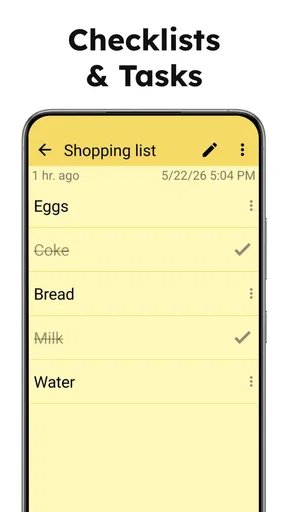
Picture a familiar evening: I’m checking the kitchen cupboards while someone else is heading to the store. A short checklist is more useful than a full planning system here. I can write down what is missing, keep unrelated errands in separate notes, and use colors to make the shopping list stand out from reminders or meal ideas. That simple division is one of the app’s most practical strengths: it lowers the effort required to capture small things before they are forgotten.
For a household, though, a note on one person’s phone is not automatically a shared workspace. I would treat ColorNote as a personal notebook first and use its sharing option when another person needs a copy of a list or message. That distinction matters: sending a note is useful for coordination, but it is not the same as both people editing one live list together. If several people need to update the same task in real time, a dedicated collaborative list app may be a better fit.
Set sensible boundaries before adding private details
I’d keep household notes practical: groceries, a packing checklist, a list of chores, or a reminder to pick something up. A color can help separate those from personal writing, but color is an organizational cue, not a privacy barrier. Password-locking a note is helpful when I want an extra layer around particular content, yet it does not turn a shared device into separate user accounts or make every note private by default.
That is worth considering if a tablet or phone is passed around at home. Before leaving a personal note open on a device someone else can use, I would close it and lock sensitive entries rather than assuming that a screen full of different colors creates account boundaries. For passwords, financial details, or information that needs stronger protection, I would choose a purpose-built secure tool instead of treating a notepad as a vault.
ColorNote is a free productivity app from developer Notes, and its broad appeal is reflected in an average rating of 4.9 from around 3.9 million ratings, alongside over 100 million installs. Its age rating is Everyone, which makes the basic idea approachable across a household, but age suitability is not the same as a child-specific account or parental controls. I would still decide what a child can access on the device itself.
Coordinate by making each note easy to act on
For a family routine, I find it more useful to make notes specific than to create one enormous page. “Buy milk” can sit on a shopping checklist, while “bring the permission slip” belongs in a separate reminder. A clear title and a distinct color make a quick scan easier, especially when there are several small jobs competing for attention. The trade-off is that too many colors and scattered notes can become their own mess, so I’d keep a small, consistent color scheme.
Sharing is best for passing information along: a list for a one-off trip, directions, or a note someone needs to read. If the other person changes their plans, I would not assume my original copy updates automatically; I’d send the revised version or agree on which person maintains it. That modest bit of coordination prevents the common household confusion of two people acting on different versions.
Where this simple approach works—and where it doesn’t
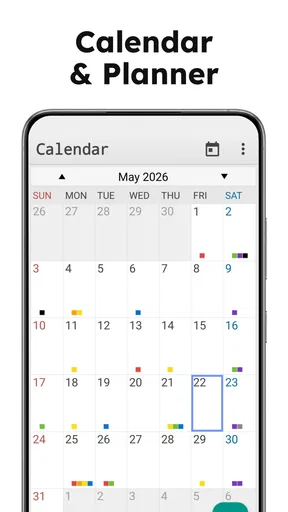
I like ColorNote most when speed matters more than elaborate structure. Compared with a large workspace app, it asks less of me: open a note, type the thought, and sort it with a color or checklist. Compared with a calendar, it is better for flexible lists and scraps of information than for a schedule that needs careful time-blocking. I would not use it as a replacement for a shared family calendar, a project board with assigned responsibilities, or a document editor for long collaborative work.
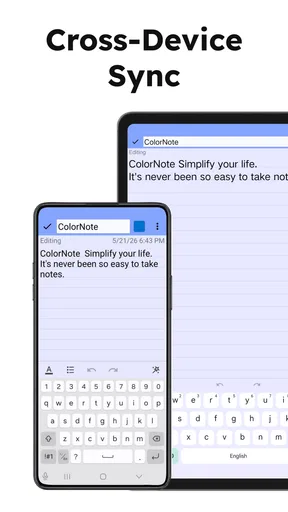
It is also worth being deliberate about moving notes between devices. The app includes sync and backup options, which can help when I use more than one device or replace one, but I would check that the notes I care about are available where I expect them before relying on a new device. A backup is most useful when I know how I will restore or retrieve it; for important information, keeping a second copy in an appropriate place is sensible.
Who I’d recommend it to at home
I’d recommend it to someone who wants a low-friction place for errands, quick reminders, and short personal notes, especially if they enjoy seeing categories at a glance. It can suit a household member who is happy to maintain their own lists and send a copy when others need it. Students and busy adults may also appreciate having lightweight checklists alongside ordinary notes rather than opening a more involved planning tool for every small task.
I’d steer people elsewhere if their main need is live collaboration, complex recurring routines, shared calendars, or strict separation between family members’ information. Likewise, anyone who expects a note app to be a secure document store should look for a tool designed for that job. The useful question is not whether ColorNote can do everything, but whether its straightforward note-taking matches the way you actually coordinate.
First Impressions: Looks Matter
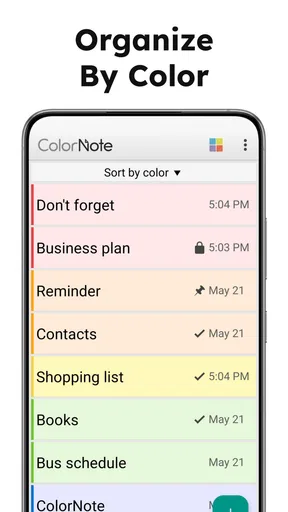
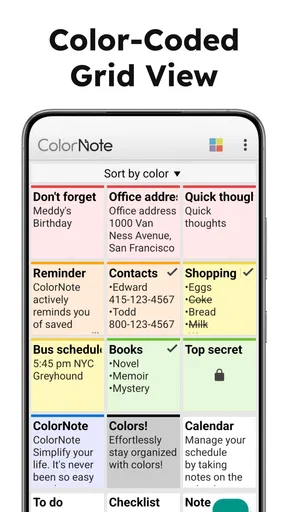
Upon opening ColorNote Notepad Notes, the first thing you’ll notice is its clean and vibrant interface. It’s like stepping into a digital stationery shop, where each note is a different color, making it easy to categorize and prioritize your thoughts at a glance. Whether you’re jotting down a grocery list or a million-dollar app idea, the burst of colors keeps everything visually engaging.
Features That Make Life Easier
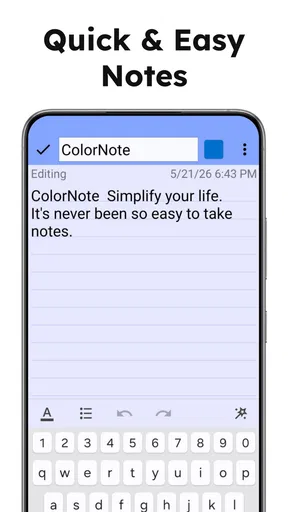
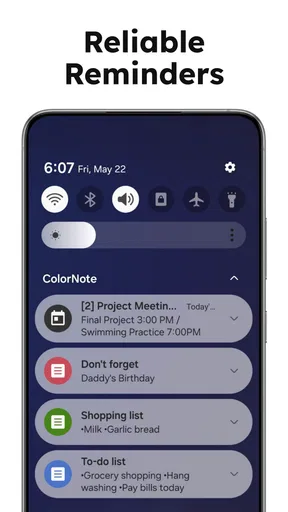
One of the standout features is the app’s versatility. You can create text notes, checklists, and even set reminders with ease. The interface is intuitive, so there’s no learning curve here — just tap, type, and go. The ability to switch between list and calendar views is a game-changer, giving you the flexibility to plan your day exactly how you want.
Adding to its charm, ColorNote syncs effortlessly across devices. Whether you’re on your phone or tablet, your notes are always with you. Just log in, and voila! Your digital notebook is ready to roll. And yes, there’s a backup feature, so you won’t lose your notes even if your device decides to take a nap.
Organization and Customization
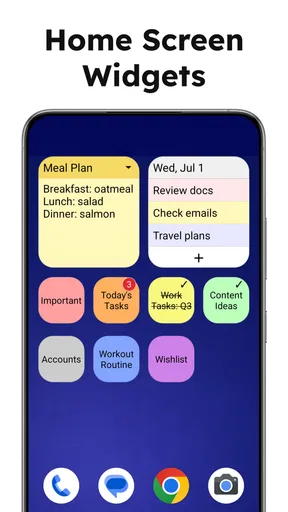
ColorNote isn’t just about notes; it’s about organizing your life in a way that suits you. The color-coded system helps, but the real magic happens with the customization options. You can pin important notes to your device's home screen, making them accessible with a single tap. It’s like having sticky notes, but without the clutter.
Moreover, the search function is super handy. Looking for a note you made a year ago? No problem. Just type in a keyword, and the app will find it for you in seconds. It’s these small touches that make the app truly user-friendly.
Security and Sharing
In today’s world, security is a big deal, and ColorNote gets that. You can lock notes with a password, ensuring your sensitive information stays private. It’s a comforting layer of protection for those confidential ideas or personal thoughts.
Sharing notes is a breeze too. Whether it’s collaborating on a shopping list or sharing an inspirational quote, you can easily send notes through email or messaging apps. It’s all about making your notes work for you, not the other way around.
The Little Extras
Sometimes, it’s the extras that make an app stand out. ColorNote offers widgets for quick access to your notes and reminders. The sticky note widget is particularly handy, letting you keep important notes front and center. Plus, the app doesn't bombard you with ads, which is a relief when you're trying to focus.
And let’s not forget the night mode. If you’re someone who prefers writing late at night, this feature will be your best friend. It’s easier on the eyes and just plain cool looking.
Final Thoughts
So, is ColorNote Notepad Notes worth the download? Absolutely. It’s a powerhouse of productivity wrapped in a simple, user-friendly package. Whether you’re a student, professional, or just someone who loves to stay organized, this app is a colorful companion you didn’t know you needed. It’s more than just a notepad; it’s a lifestyle upgrade.
Ready to dive into the colorful world of ColorNote Notepad Notes? You can find it on both Android and iOS, waiting to transform the way you handle notes, lists, and everything in between.
A practical setup for busy days
My best advice is to decide on a few categories before the notes pile up. For example, I might reserve one color for errands, another for work or study, and a third for ideas I want to revisit. The exact scheme is personal; consistency is what makes it useful. If every note gets a new color without a reason, the visual sorting stops helping.
For a packed weekday, I would keep one checklist for things that must happen today and separate it from a longer-running list of supplies or future plans. That keeps the urgent screen from becoming a storage bin for every thought. When a task is done, checking it off gives the list a clear endpoint; unfinished items can then be reviewed and moved deliberately rather than copied forward automatically.
Choosing between a note, a checklist, and a reminder
I use a plain note when the information is something to keep, such as a phone number to remember temporarily, a recipe adjustment, or questions for an appointment. A checklist is better when completion is the point: packing, shopping, or steps in a simple routine. A reminder makes sense when timing matters and I need a prompt rather than merely a place to store text. Keeping these purposes distinct makes the app easier to scan later.
There is a small but important trade-off: a note can hold lots of unrelated details, but that convenience can make retrieval harder. I would split a long entry when it starts serving multiple purposes, then use a specific title and search terms I am likely to remember. Search is especially useful when I know a phrase but cannot recall the note’s color or where it sits in my list.
What to expect from the free app
The app is free to install, with optional in-app purchases listed from $1.99 to $15.99 per item, so I would check the purchase screen before choosing anything paid. The current version is 4.8.4. I would not treat either detail as a reason to buy: the better test is whether the everyday note and checklist workflow already fits. A paid option is only worth considering if its specific benefit matters to you.
ColorNote is strongest as a compact personal organizer, not as a complete productivity suite. Someone who needs elaborate formatting, large research documents, task assignments, or tightly connected project planning may find a dedicated notes or work-management app more suitable. On the other hand, those tools can add setup and navigation that feel unnecessary when all I need is a quick list and a reliable place to put an idea.
A measured household verdict
For shared-device homes, I see ColorNote as a handy personal tool that can support coordination, provided everyone understands its boundaries. It is approachable, quick to use, and flexible enough for ordinary lists, yet it does not replace separate accounts, a jointly maintained task system, or a secure repository for sensitive records. I would start with one real household routine, such as shopping or packing, and see whether its simple structure makes that routine easier before moving more of the family’s planning into it.
Verdict
Strengths of ColorNote Notepad Notes
- User-friendly interface, easy to navigate.
- Color-coded notes for quick organization.
- Supports checklist creation and reminders.
- Automatic cloud backup ensures data safety.
- Widgets available for quick access on home screen.
Limitations of ColorNote Notepad Notes
- Limited rich text formatting options.
- No collaborative editing features.
- Ads can be intrusive in free version.
- Lacks cross-device synchronization.
- No password protection for individual notes.
Other Releases by notes
View All
Notepad - Notes and Notebook
Tools4.0
Similar Picks in This Category
View All
Google Calendar
Google LLC4.6

Google Drive
Google LLC4.3

Google Assistant
Google LLC3.9

Microsoft OneDrive
Microsoft Corporation4.6

Samsung Calendar
Samsung Electronics Co., Ltd.4.1

Microsoft OneNote: Save Notes
Microsoft Corporation4.6
Frequently Asked Questions
What is ColorNote Notepad Notes, and how does it work?
ColorNote Notepad Notes is a versatile note-taking app available on Android and iOS devices. It allows users to create and organize notes, lists, and reminders using a color-coded system. This makes it easy to keep track of different tasks and ideas. The app is designed for simplicity and efficiency, ensuring users can quickly jot down thoughts and manage them effectively.
Does ColorNote Notepad Notes offer backup and synchronization options?
Yes, ColorNote provides backup and synchronization features to ensure your notes are safe and accessible across multiple devices. Users can sync their notes to the cloud using their email, allowing them to restore data or access their notes from any device. This feature is particularly useful for keeping your information secure and always within reach.
Can I customize the appearance of my notes in ColorNote?
Absolutely, ColorNote allows users to customize their notes using a variety of colors. This color-coding system helps in organizing notes by categories or priority levels. Users can also choose between grid and list views to display their notes, providing flexibility in how information is presented and accessed.
Is there an option for setting reminders in ColorNote Notepad Notes?
Yes, ColorNote Notepad Notes includes a reminder feature, allowing users to set alerts for specific notes. This is particularly useful for keeping track of deadlines, appointments, or important tasks. Users can set one-time or recurring reminders, ensuring they stay on top of their schedules and commitments.
Does ColorNote Notepad Notes work offline?
ColorNote is designed to function seamlessly offline, allowing users to create and manage notes without needing an internet connection. This ensures that your notes are always accessible, regardless of connectivity. However, to sync notes across devices or back them up, an internet connection is required.
